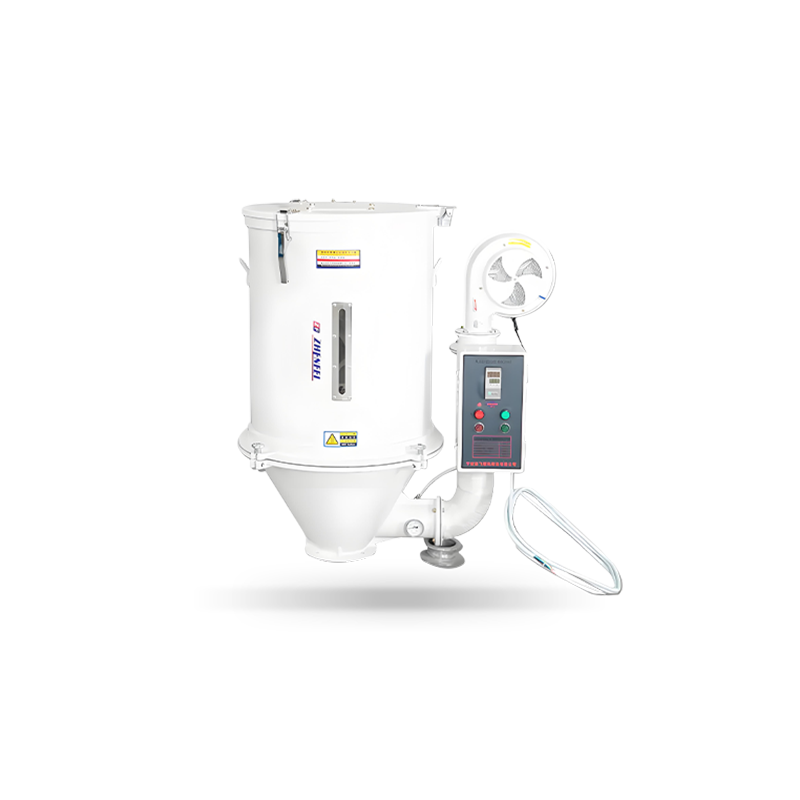
To troubleshoot common issues with an SDF Hopper Plastic Dryer, you need to systematically check four core areas: airflow and temperature performance, desiccant condition, moisture control output, and material handling problems. Most dryer problems — from poor drying results to overheating alarms — trace back to one of these systems. This guide walks through each major failure category with specific causes, diagnostic steps, and corrective actions to get your dryer back to peak performance quickly.
Understanding the SDF Hopper Dryer System Before You Diagnose
Effective troubleshooting starts with understanding how the system is supposed to work. The SDF Hopper Plastic Dryer operates as a closed-loop desiccant drying system. Ambient return air from the hopper passes through a filter, enters a desiccant rotor (molecular sieve wheel), exits as low dew-point supply air (typically -40°C to -60°C dew point), is heated to the target drying temperature, and flows upward through the resin bed in the hopper.
Any disruption in this cycle — blocked airflow, degraded desiccant, faulty heating, or sensor failure — will directly affect drying performance and part quality. Knowing which stage is failing narrows your diagnosis immediately.
Issue 1: Resin Is Not Drying Properly — Moisture Defects Still Appear
This is the most common complaint. Parts show splay marks, bubbles, or surface streaks even though the dryer is running. The root cause is almost never the molding machine — inadequate drying is the first suspect.
Possible Causes and Fixes
- Drying temperature set too low: Verify the setpoint matches the resin manufacturer's recommendation. PA6 requires 80–90°C; PET requires 160–180°C. A setting even 10°C below spec can add 2–3 hours of required drying time.
- Insufficient residence time: If material consumption exceeds the hopper's supply capacity, pellets exit undried. Check that hopper volume supports at least 2–3× the required drying duration at current throughput.
- Dew point too high: If supply air dew point is above -20°C, the desiccant is saturated or degraded. Trigger a manual regeneration cycle and recheck dew point.
- Resin re-absorbing moisture after drying: A poorly sealed hopper-to-throat connection allows humid shop air to contact dried pellets. Inspect and reseal all joints and connections.
- Wrong resin loaded: Different resin grades may have different drying requirements. Confirm the programmed recipe matches the actual material being processed.
Quick Diagnostic Check
Use a handheld moisture analyzer to sample pellets directly from the hopper discharge. If measured moisture exceeds the resin's target (e.g., >0.02% for PC), the dryer is underperforming and the above causes should be investigated in order.
Issue 2: Supply Air Dew Point Is Too High
A rising dew point — especially above -20°C when the target is -40°C or lower — is a reliable indicator that the dehumidification system is compromised. This single reading can explain most drying failures.
| Symptom |
Likely Cause |
Corrective Action |
| Dew point gradually rising over weeks |
Desiccant rotor contamination or aging |
Inspect and clean rotor; replace if >5 years old |
| Dew point spikes during humid seasons |
Undersized desiccant system for ambient load |
Reduce throughput or upgrade to larger rotor |
| Dew point high immediately after startup |
Rotor not completing regeneration cycle |
Check regeneration heater and rotor motor function |
| Dew point stable but still too high |
Dew point sensor out of calibration |
Calibrate or replace dew point sensor |
Table 1: Common dew point problems, their causes, and corrective actions for SDF Hopper Dryers
Issue 3: Dryer Not Reaching or Maintaining Target Temperature
If the dryer displays a temperature lower than the setpoint — or if the temperature fluctuates significantly — drying effectiveness drops. A temperature variance of ±5°C or more from setpoint is enough to cause inconsistent drying results, particularly for sensitive resins like PET or PC.
Diagnosing Heating Problems
- Heating element failure: Check resistance across heating elements with a multimeter. An open circuit (infinite resistance) indicates a burned-out element that must be replaced.
- Thermocouple or RTD sensor failure: A faulty temperature sensor causes the controller to misread actual temperature. Compare the display reading against an independent calibrated thermometer placed in the airstream.
- PID controller malfunction: If the heating element and sensor are functional but temperature still hunts or drifts, re-tune PID parameters or replace the controller board.
- Blocked airflow reducing heat transfer: A clogged return air filter reduces airflow velocity, lowering effective heat delivery to the hopper even when the heater is working. Check filter condition first — it is the simplest fix.
Issue 4: Overheating Alarm or Thermal Cutout Triggering
Overtemperature alarms protect the resin and equipment, but frequent triggering indicates an underlying problem. Never simply reset the alarm without identifying the root cause — repeated overheating can degrade heat-sensitive resins and damage the dryer's internal components.
Common Causes of Overheating
- Setpoint entered incorrectly: Verify the operator did not accidentally enter a temperature 10× or 100× the intended value (e.g., 800°C instead of 80°C).
- Blower motor failure: Without airflow, heat builds up rapidly in the heater chamber. Check that the blower motor is running at full speed and that the impeller is not cracked or loose.
- Thermal cutout sensor fault: If the over-temperature safety sensor triggers at a normal operating temperature, the sensor itself may have drifted out of calibration. Test with an independent thermocouple before replacing the cutout device.
- Excessive ambient temperature: In hot factory environments (above 40°C), the dryer's heat dissipation may be insufficient. Ensure adequate ventilation around the unit — a minimum clearance of 500mm on all sides is typically required.
Issue 5: Poor or No Airflow Through the Hopper
Reduced airflow is one of the most impactful yet easiest-to-overlook problems. Without adequate airflow, even a perfectly functioning heater and desiccant system cannot dry the resin effectively. Airflow problems account for an estimated 30–40% of reported SDF dryer performance complaints in field maintenance records.
Airflow Troubleshooting Steps
- Inspect and clean the return air filter. This is the first and most common cause. A filter loaded with resin dust can reduce airflow by 50% or more. Clean or replace every 500 hours of operation, or more frequently in high-dust environments.
- Check blower motor current draw. A motor drawing significantly below rated current may have a failing capacitor or worn bearings reducing impeller speed. Compare actual current draw to the nameplate value.
- Inspect the hopper inlet diffuser. Fines and angel hair (stringy resin strands) can pack around the hopper air inlet diffuser, blocking airflow distribution across the resin bed.
- Check for kinked or crushed hose connections. If flexible hoses connect the dryer to the hopper, inspect for kinks, collapses, or disconnected joints that reduce effective air delivery.
- Verify the hopper discharge valve is not restricting return flow. A partially closed loader or slide gate below the hopper can create back pressure that reduces airflow through the material bed.
Issue 6: Resin Bridging or Clumping Inside the Hopper
Bridging occurs when pellets fuse or compact inside the hopper, blocking material flow to the molding machine. This is particularly common with low-melt-temperature resins like TPU, EVA, and some PA grades when drying temperatures approach their softening point.
Causes and Solutions
- Drying temperature too high for the resin: TPU softens at temperatures as low as 90–100°C. If the drying setpoint is set to 110°C or above for this material, pellets can partially fuse. Always verify the material's Vicat softening point and set drying temperature at least 20–30°C below it.
- Hopper filled too far above normal level: Excess material weight increases compressive force on lower pellets, promoting bridging. Maintain fill level at no more than 80% of hopper capacity for soft resins.
- Extended static dwell time: Resin left in a hot hopper overnight without movement can compact and bridge. If production is stopped, reduce hopper temperature to 40–50°C in hold mode.
- Pellet geometry issues: Irregular or oversized pellets bridge more easily. If switching to a new resin batch with different pellet size, reduce hopper fill level and monitor flow rate for the first hour.
Issue 7: Control Panel Alarms and Error Codes
Modern SDF Hopper Dryers display fault codes that, when interpreted correctly, direct you immediately to the failing component. Below are the most common alarm types and what they indicate.
| Alarm Type |
What It Means |
First Action |
| High Temperature Alarm |
Process or safety temperature exceeded |
Check blower function; verify setpoint is correct |
| Low Temperature Alarm |
Heater not reaching setpoint |
Test heating element continuity; check filter for blockage |
| Blower Motor Fault |
Motor overcurrent, overload, or failure |
Reset overload relay; check for mechanical obstruction |
| Desiccant Rotor Fault |
Rotor motor stopped or rotor jammed |
Inspect rotor for debris; check drive belt or gear |
| Sensor Error / Open Circuit |
Temperature or dew point sensor disconnected or failed |
Check sensor wiring connections; replace sensor if open circuit confirmed |
| Communication Error |
Controller-to-display or network link failure |
Cycle power; check control cable connections |
Table 2: Common SDF Hopper Dryer alarm types, meanings, and recommended first response actions
Preventive Maintenance Schedule to Avoid Recurring Issues
Most SDF Hopper Dryer problems are preventable. A structured maintenance routine eliminates the majority of unplanned downtime before it occurs. Facilities that follow a preventive maintenance schedule report 70–80% fewer unplanned dryer-related stoppages compared to reactive-only maintenance approaches.
Recommended Maintenance Intervals
- Daily: Check supply air temperature and dew point readings against setpoints. Inspect hopper material level. Confirm no active alarms.
- Weekly: Inspect return air filter for visible dust buildup. Check all hose and duct connections for looseness or cracking. Log dew point values to track trends.
- Every 500 hours: Clean or replace return air filter. Inspect hopper interior for fines, angel hair, and resin buildup. Verify blower motor current draw.
- Every 6 months: Calibrate dew point sensor. Test thermal cutout safety device. Inspect heating element insulation resistance. Check rotor drive mechanism for wear.
- Annually: Full inspection of desiccant rotor for contamination and structural integrity. Replace rotor if dew point cannot reach -30°C after cleaning. Perform full electrical safety inspection.
When to Call a Technician Instead of Troubleshooting In-House
While many SDF Hopper Dryer issues can be resolved by trained production or maintenance staff, some situations require qualified service technicians to avoid safety risks or further equipment damage.
- Repeated thermal cutout tripping after reset — indicates a potential wiring fault or persistent heater short circuit.
- Dew point remains above -20°C even after filter cleaning and manual regeneration — the desiccant rotor likely needs professional service or replacement.
- Blower motor overload trips repeatedly — may indicate winding failure, bearing seizure, or a control board fault requiring component-level diagnosis.
- Burning smell or visible scorch marks near the heater chamber — stop the unit immediately and do not restart until inspected by a qualified electrician.
- PID controller displaying persistent error codes that do not clear after power cycling — the controller board or firmware may need replacement or reprogramming.

 Custom Zhenfei Electric Injection Molding Machine Manufacturers
Copyright © Ningbo Zhenfei Injection Molding Machine Manufacturing Co., Ltd. Rights Reserved.
Custom Zhenfei Electric Injection Molding Machine Manufacturers
Copyright © Ningbo Zhenfei Injection Molding Machine Manufacturing Co., Ltd. Rights Reserved.



 中文简体
中文简体 English
 Español
 中文简体
中文简体